Speak, don't type.
Yap it.

Push-to-talk for YouTube comments and live chat — plus a chat reader that speaks every message aloud. Hold the hotkey, say what you think, and QuickYap types it in for you. Private by design: everything stays on your own computer.

7-day free trial · no card required · Mac (Intel & Apple Silicon) & Windows

Real recording — speech to sent, start to finish.

How it works

Three moves, no keyboard gymnastics.

1

Hold the hotkey

Press and hold the Option key (⌥ — labelled "alt" on some keyboards) — or just click-and-hold the big yellow button — even while you're watching the stream.

2

Say your comment

Talk naturally. An on-device speech model transcribes you instantly — audio never leaves your Mac.

3

It's typed for you

Release and your words land in the YouTube comment box or live chat — review, then hit send.

Watch it in action

The full walkthrough — setup, push-to-talk, live chat, and voice replies.

QuickYap tutorial video
Jump to
  1. 0:00Intro
  2. 1:10Tool panel UI
  3. 3:23Quick emojis
  4. 4:59Quick phrases
  5. 6:40Quick mentions
  6. 7:44Top menu & second chat
  7. 12:24Audio settings & chat reader
  8. 15:14How to send a QuickYap

The panel, up close

Not a generic dictation tool — a real panel that lives on the page you're watching. Here's what you're looking at.

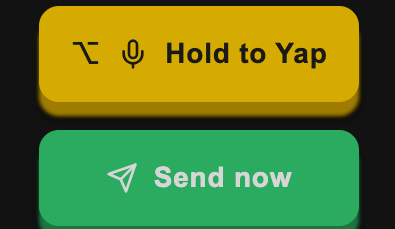
Hold to Yap button and Send now button

Hold it. Say it. Send it.

Hold the big yellow button — or the Option (⌥) hotkey — and talk. Release, and your words are ready. One tap of Send now drops them into the active comment box or live chat.

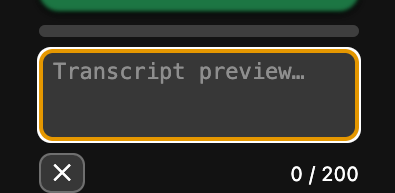
Transcript preview box with character counter

Review before it posts

A live transcript preview shows exactly what was heard, with a character counter for chat limits. Nothing goes into YouTube without you seeing it first — edit it, clear it, or send it.

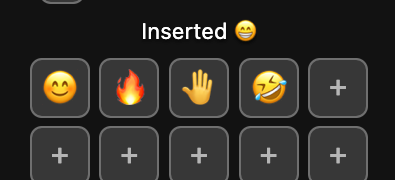
One-tap emoji chips

Emoji in one tap

A row of your most-used emoji, always a tap away — for the moments that don't need a sentence. Fill the empty slots with whichever ones you actually use.

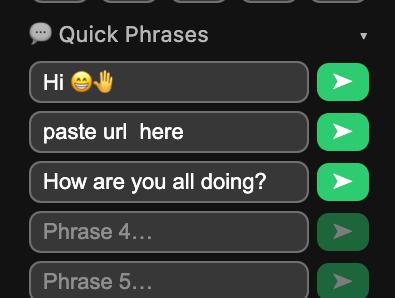
Quick phrases list with one-tap send buttons

Quick phrases, one tap

Your go-to replies — greetings, thanks, the things you say every stream — saved and one tap away. Fill the slots once, fire them forever.

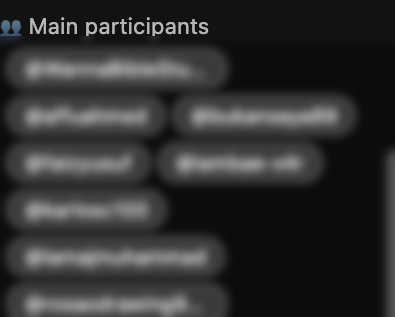
Participants list tracking who's in the live chat

See who's in the room

A live participants list fills in as people chat — tap a name to address them directly in your reply. Never lose track of who's who in a fast-moving chat.

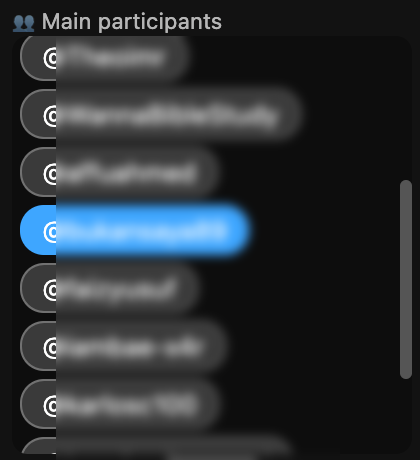
A participant selected for a direct mention, highlighted in blue

Talk to one person

Tap someone's name and it turns blue — their @handle drops straight into your message, so your reply reaches the person you meant. Tap again to clear it. (Names blurred here for privacy.)

Chat reader toggle in the QuickYap topbar

Let it read the chat to you

Flip on the chat reader and new messages are spoken aloud in the voice you choose — so you can keep watching, keep working, and still follow every word.

Second chat and pop out chat buttons

Two streams at once

When a channel goes live twice — main desk and roving mobile — QuickYap spots the second broadcast on its own and lets you open that chat alongside the first. Or pop any chat out into its own window.

QuickYap running on a YouTube live stream with the panel docked on the left

The whole thing in one window — panel docked on the left, YouTube exactly as you know it. (Viewer names blurred for privacy.)

✓100% on-device — transcription runs locally; your voice never leaves your Mac
✓Comments & live chat — speaks into whichever box is active
✓Second-chat companion — detects when a channel runs two streams and follows both
✓Works offline — no cloud, no account, no uploads
✓3 Macs per licence — Intel and Apple Silicon
✓Free updates — new versions arrive in-app automatically

Simple pricing

One licence, three Macs, every feature. Cancel subscriptions anytime.

Monthly

£4.99
per month
  • Every feature, no limits
  • 3-device licence
  • Free updates
  • Cancel anytime
Subscribe monthly

Lifetime

£99
one payment
  • Every feature, no limits
  • 3-device licence
  • All future updates
  • Nothing to renew, ever
Buy once, own it

Every plan starts with a 7-day free trial — download first, pay only if it earns its keep.

Download QuickYap

Free to download. Your 7-day trial starts automatically — no card, no account.

Apple Silicon

M1 · M2 · M3 · M4 Macs
Download DMG

Intel

Older Intel-based Macs
Download DMG

Windows

Windows 10 / 11
Download EXE
Windows may show "Windows protected your PC" — normal for a new app. Click "More info" → "Run anyway".
Not sure which Mac you have? Click the menu (top-left of your screen) → About This Mac. If it says Chip → Apple Silicon. If it says Processor → Intel.

Mac: requires macOS 12 Monterey or later, signed & notarized by Apple · Windows: Windows 10/11 · ~250 MB download

Questions

Does my voice get uploaded anywhere?

No. Transcription runs entirely on your computer using an on-device model. Your audio never leaves the machine — QuickYap works offline.

Windows says "Windows protected your PC" — is it safe?

Yes. Windows shows this SmartScreen warning for new apps that don't yet have a paid code-signing certificate — it doesn't mean anything is wrong. Click "More info", then "Run anyway". The app is the same build we use ourselves; future releases will be signed once we add a certificate.

How does the free trial work?

Download and open the app — your 7-day trial activates automatically on that computer. No card, no signup. When it expires you'll be invited to buy a licence.

How many computers can I use it on?

Each licence activates up to 3 computers (Mac or Windows) — yours, not a family's. Deactivate a machine to free a slot.

Can I cancel a subscription?

Anytime, from your customer portal (linked in your licence email). You keep access until the end of the paid period. See our refund policy.

Does it work in live chat, or just comments?

Both — it speaks into whichever input is active, including fast live chat. It can also detect when a channel runs a second live stream and follow that chat too.